
Stop Discovering Budget Overruns at Month-End
Track every dollar in real-time. Get alerted at 70%, 90%, 100% of budget. Make adjustments before overruns happen, not after.
.avif)
Overview
Month-end should not be a surprise. But when budget data lives in accounting systems and field spending happens on paper timesheets, you discover problems seven days too late. By the time finance compiles the month-end report, that consultant already billed you 20% over budget. That equipment rental already ran three weeks past authorization. Matidor tracks budget in real-time as spending happens. Field costs flow directly into budget calculations. Automated alerts notify you when projects approach limits. Monthly close drops from seven days to thirty minutes. Transform budget surprises into budget control.
Teams That Stopped Month-End Budget Surprises Use Matidor
.png)


.png)




.png)





Manage Every Dollar in Real-Time
See the setup in action: add a project budget, configure cost codes, and enable spending alerts.
Visibility and Monitoring
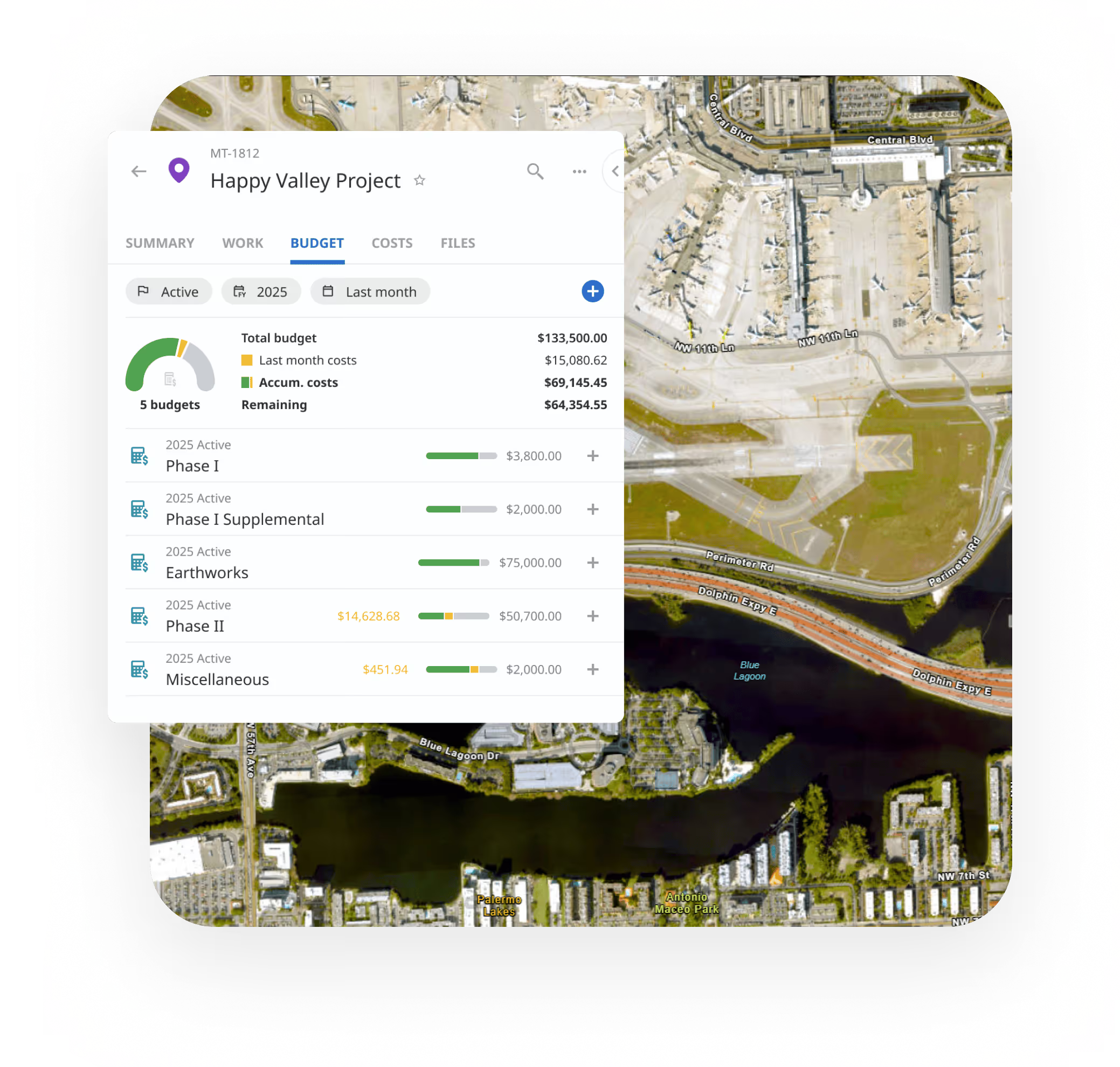
- Real-Time Budget Tracking: See spending against budget allocations instantly without waiting for month-end reports, identify overruns at a glance.
- Automated Spending Alerts: Get email notifications automatically when costs hit 70%, 90%, or 100% of budget thresholds.
- Portfolio Dashboards: View total spending across all active projects in one place, identify which consume the most resources.
Integration and Tracking
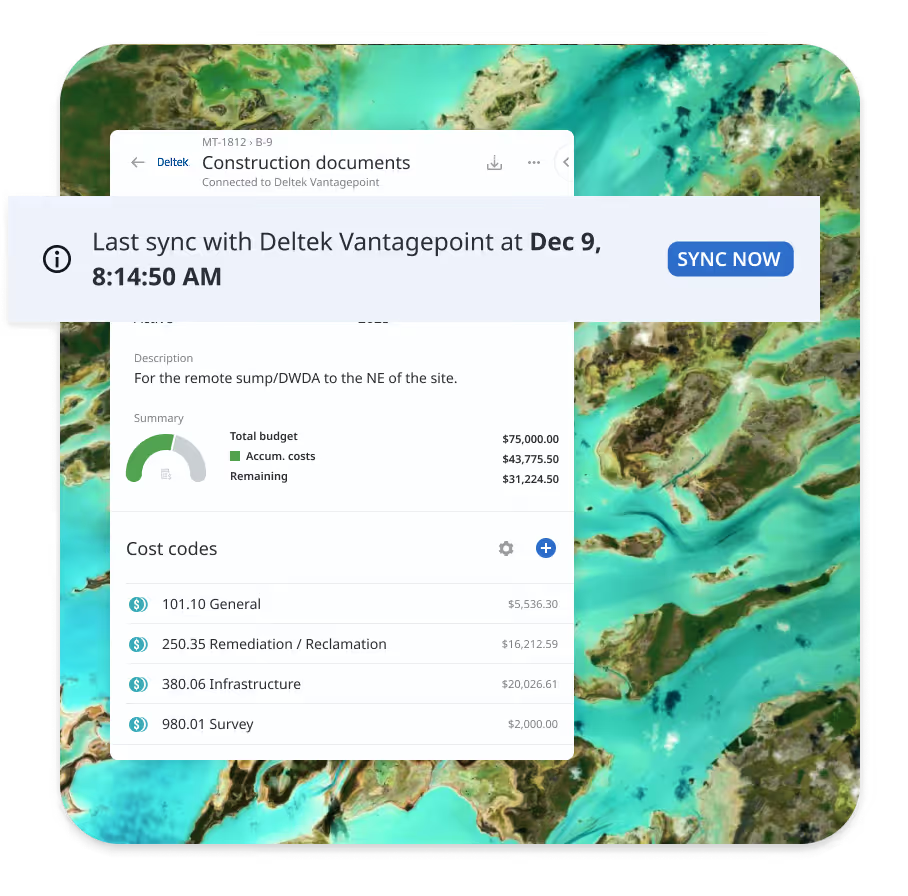
- Accounting System Sync: Synchronize expenses with QuickBooks Online, Deltek Vantagepoint, Replicon, or Harvest.
- Contractor and Vendor Management: Monitor contractor and vendor costs independently, track actual spending against allocated budgets by project phase.
- Resource Cost Tracking: Track labor costs by individual team member and by project, see which projects consume the most labor resources.
Budget Structure and Control
- Multi-Level Budgeting: Create detailed budgets at project, portfolio, and cost center levels simultaneously, roll up costs automatically.
- Budget Allocation and Tracking: Allocate budget amounts for each project broken down by cost category, track actual spend-to-date in real-time.
- Cost Categories and Allocation: Define custom cost categories that align with your chart of accounts, separate spending by resource type.
- Budget Permissions: Control who can view or update budgets using role-based permissions, maintain financial confidentiality while enabling collaboration.
Reporting and Analysis
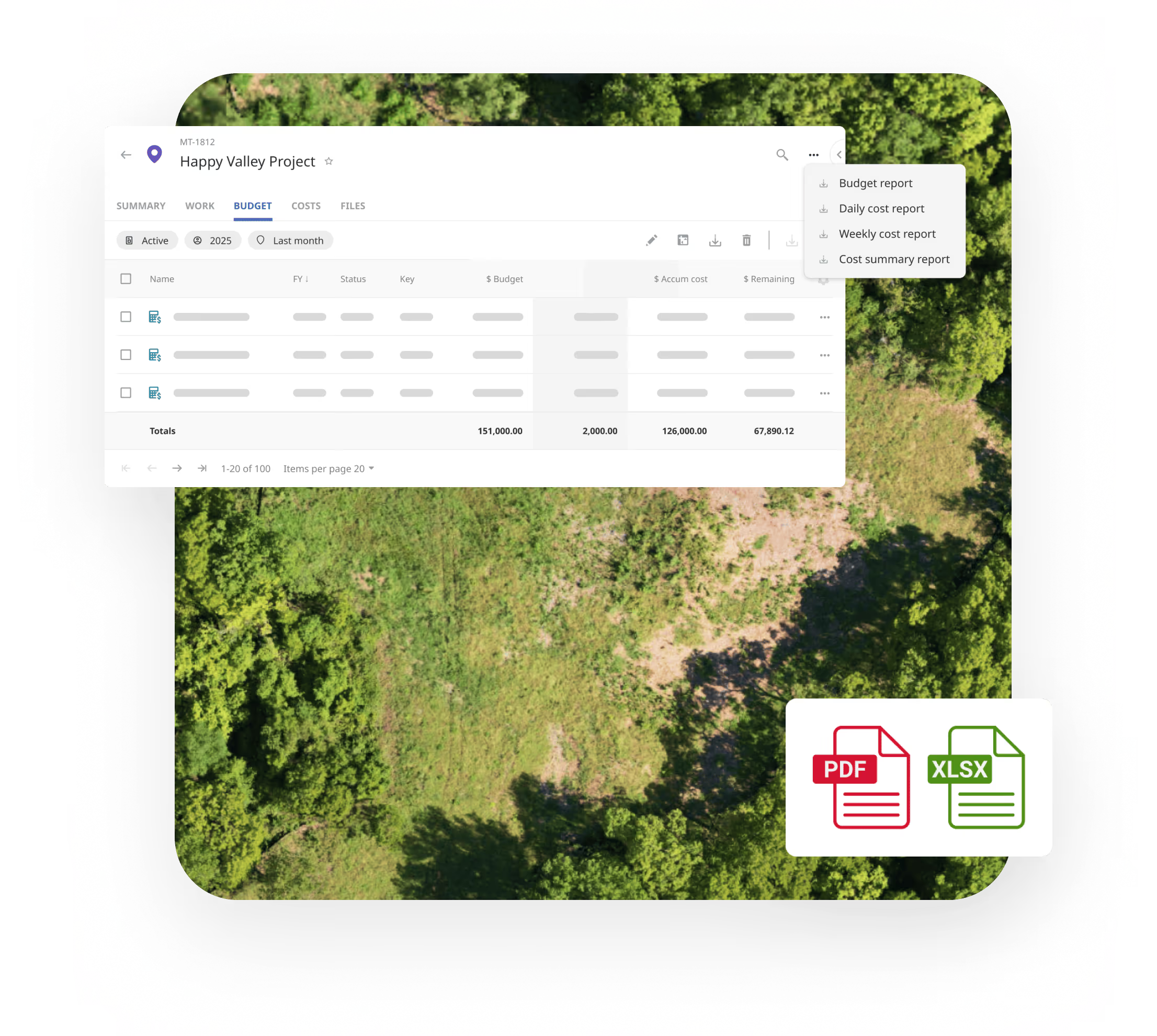
- Cost Accrual Reports: Generate accurate month-end accrual reports in minutes, reduce your financial close time from days to minutes.
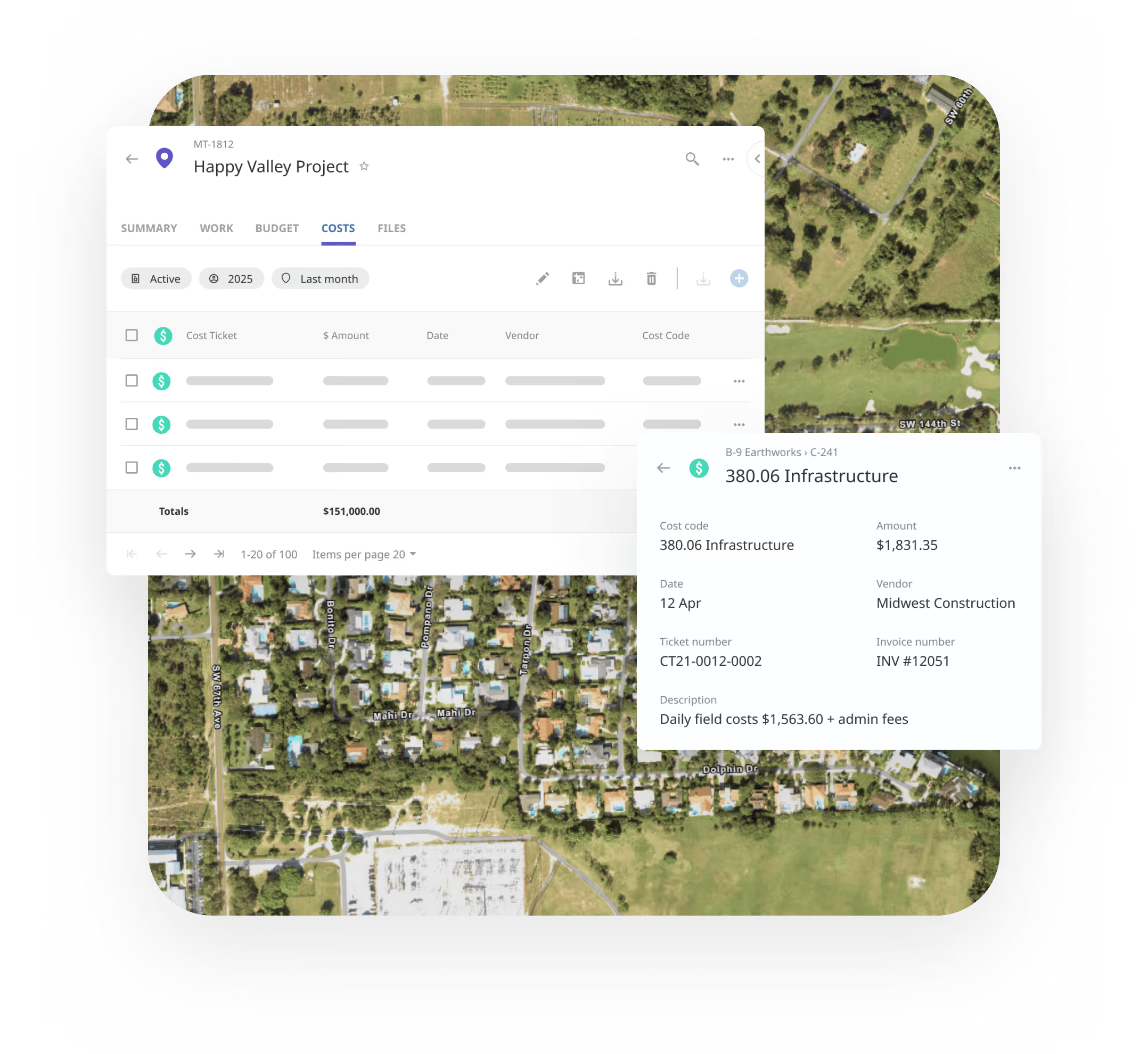
- Cost Breakdown Reports: Analyze spending by category, project, location, or individual team member with drill-down detail.
- Discover and Access Cost Items: Look up individual cost items using powerful search and advanced filters.
Need a client or month-end deliverable? Watch how to export budget and cost details as controlled PDF reports.
Integrated with Matidor's Platform

Project Management Integration
Link budgets directly to projects so every dollar connects to deliverables. Track spending against allocations in real-time with automated alerts when costs approach limits, enabling budget adjustments before overruns happen.
Learn more about our Integrations→
Location Intelligence for Budget Control
View budget status by location on interactive maps to identify geographic spending patterns. Track costs across multiple field sites simultaneously and see which locations are over or under budget at a glance.
Learn more about Location Intelligence →
Field Operations Cost Tracking
Capture field costs in real-time as work happens so budget data stays current without delays. Field teams enter expenses, equipment usage, and contractor costs directly from job sites, updating budgets automatically.
Learn more about Field Operations →
Real-Time Visibility Without Accounting Delays
Unlike spreadsheets with manual reconciliation and no alerts, accounting-only systems with 5-7 day delays, or generic PM tools with limited budget capabilities, Matidor provides real-time budget tracking with automated alerts and accounting sync built specifically for field operations.
Key Advantages:
- Real-time without accounting delays: See spending instantly as field teams log costs
- Automated alerts: Get notifications at 70%, 90%, 100% before overruns happen
- Project manager access: See budget status anytime without finance bottlenecks
- Month-end accrual automation: Drop from days to minutes
- Field capture integration: Costs logged in field appear immediately in financial dashboards

Budget Control by Industry
Oil and Gas
Real-Time Consultant Cost Tracking
Operations manager oversees multiple projects with consultants. Invoices through accounting create 5-7 day delays. Overruns already happened by then.
With Matidor: Consultants enter costs as work happens. Manager sees spending in real-time. Costs hit budgets immediately. Monthly accrual from days to minutes.
Result: Spending stays within budget, decisions with current data, overruns prevented.
Explore Oil and Gas Solutions →
Environmental Services
Multi-Project Budget Visibility
Firm manages dozens of projects. Project managers have limited accounting access. Cost reports require special requests taking hours. No visibility until month-end.
With Matidor: Each PM has instant budget access anytime, anywhere. System displays budget status on dashboard. Alerts notify at 70%, 90%, and 100%.
Result: Project managers control spending proactively. Budget conversations happen before overruns. Finance closes books faster.
Multi-Site Operations
O&M Budget Management
Operations managers track O&M budgets for energy installations across multiple sites, monitoring maintenance spending and equipment costs in real-time.
With Matidor: All sites display budget status on portfolio dashboard. Filter by site, equipment type, or cost category. Maintenance costs tracked separately from capital expenses.
Result: O&M spending stays within annual allocations. Resource allocation decisions data-driven. Unexpected expenses caught early.
Teams Using These Capabilities

Earthmaster Case Study

Karve Case Study

Peyto Case Study
Frequently Asked Questions
Yes, native integrations with major accounting platforms work out of the box. Matidor syncs automatically with QuickBooks Online, Deltek Vantagepoint, Replicon, and Harvest. Expenses flow from your accounting system into Matidor in real-time, eliminating double data entry completely. Project budgets map directly to your chart of accounts so cost codes stay aligned across systems. If you use a less common accounting platform, our REST API handles custom integrations.
Budget alerts configure in minutes with threshold-based notifications that catch problems before they escalate. Default alerts trigger at 70%, 90%, and 100% of budget allocation. When spending hits these thresholds, the system sends automatic email notifications to project managers immediately. Managers receive alerts as soon as thresholds are reached, giving them time to review spending patterns, reallocate resources, or adjust project scope before overruns become financial crises.
Absolutely, with zero limitations on project duration or fiscal year boundaries. Define project budgets that run across any time period (12 months, 3 years, 5+ years for long-term programs). Track spending continuously as projects cross fiscal year boundaries without resetting or manual adjustments. Generate reports filtered by any date range you need (calendar year, fiscal year, quarter, custom periods). Historical spending data remains accessible indefinitely for audit purposes, benchmarking analysis, and regulatory compliance documentation.
Matidor provides early warning and controlled overage management so budget problems never become surprises. Automated alerts notify managers when spending approaches budget limits (typically at 70% and 90% thresholds), giving visibility into potential overruns before they occur. Analyze why projects overran to improve future estimates. Identify whether labor costs, equipment expenses, contractor spending, or third-party costs drove the variance.
Labor cost tracking integrates seamlessly with time tracking systems for automated allocation without manual data entry. Sync Matidor with your time tracking platform (Replicon, Harvest, or other timesheet systems), and employee timesheets automatically capture labor hours by project. Labor costs calculate automatically from hourly rates and allocate to projects based on timesheet entries. View labor cost visibility by project and by individual team member to understand exactly where labor dollars are being spent.
Yes, through portfolio dashboards that consolidate budget status across unlimited projects simultaneously. The portfolio view displays every active project budget side by side with color-coded status indicators (on budget, approaching limit, over budget). Spot which projects are consuming budget fastest, which still have plenty of budget remaining, and where to shift financial attention or resources.
Definitely, through benchmarking reports that compare project types side by side for continuous improvement. Filter projects by type, industry, client, or custom tags to group similar work together. See which project types are most profitable and which consistently overrun budgets or timelines. Benchmark key metrics including budget variance percentage, cost per unit, labor efficiency, contractor cost ratios, and schedule performance.
Absolutely, with full data portability in standard formats for complete flexibility. Export budget data as CSV files or Excel spreadsheets including actuals, forecasts, variance, cost category breakdowns, and transaction-level detail. Pull exactly the data you need using custom filters (date range, cost categories, projects, portfolios) before export.
Update budget allocations anytime, with complete change history and audit trails. Reallocate funds between cost categories, adjust project budgets based on change orders, and track variance against both original and revised budgets. Automated alerts recalculate based on updated allocations.
Yes. View projected total cost based on current spending trends, estimate completion costs using burn rate analysis, identify projects likely to exceed budget before it happens, and adjust resource allocation proactively. Forecasting supports monthly, quarterly, and project-to-completion views.
Configure multiple currencies for projects in different countries, apply exchange rates (manually updated or automatically from financial services), and report in your base currency with conversion details. Track currency fluctuations and their impact on project budgets.
Generate transaction-level detail reports, cost allocation reports by project and category, accrual reports for month-end close, variance analysis reports comparing budget to actuals, audit trail reports showing all financial changes with timestamps and user attribution. Export all reports to Excel or PDF for auditor review.
See Matidor in Action With Your Project Data

See Portfolio Management in Action
Schedule a 30-minute demo. We'll show you how to manage your specific project portfolio with real-time dashboards, custom workflows, and geographic coordination.
You'll See:
- Your projects displayed on portfolio dashboards
- How custom workflows would enforce your processes
- Geographic coordination for multi-site operations
- Real-time budget tracking integrated with projects
Or Start Free for 14 Days
Get full platform access immediately. Import your current projects. Build custom templates. See real results with your data.
- Full access to all features
- Live chat support during trial
- No credit card required
- Cancel anytime