
For a while, spreadsheets and email threads feel manageable, even comforting. Then one day you realize you are responsible for 40, 60, or 100 active field projects, each with its own budgets, consultants, and deadlines. Suddenly, the simple tools are no longer simple. Most teams hit a breaking point between 10 and 20 active projects. Below that threshold, individual project managers can track their own workbooks, remember context, and manually keep stakeholders updated. Once you cross it, portfolio visibility vanishes and “who owns what” becomes a daily firefight instead of a clear plan.
This article lays out a practical framework for managing dozens of concurrent field projects without burning out your team. You will see where spreadsheets break, what a scalable field project portfolio actually requires, and the concrete steps to move from 10 to 50+ projects without losing control.
Why do spreadsheets break when you manage dozens of field projects?
Spreadsheets work well when the mental model is “my projects, my files, my updates.” A single project manager can keep track of site context, key risks, and who needs to know what, even if the data is spread across a few tabs and email threads. The tool is doing just enough, and the real system is the person’s memory.
As soon as you have 10, 20, or more active field projects, that model stops working. Project status ends up scattered across personal files, local folders, and ad‑hoc trackers that nobody else can see. Budget information lives in accounting systems with five to seven day delays, which means you are always reacting to cost overruns after the fact.
Field updates are buried in email, text messages, and calls, which makes it nearly impossible to reconstruct what actually happened on a specific day at a specific site. Executives cannot get a portfolio view without pulling people into a meeting and asking everyone to “go around the table.” What felt light and flexible at five projects becomes brittle and opaque at fifty.
What is actually required to manage a 50+ project field portfolio?
To manage 50 or more field projects, you need more than individual project plans and a master spreadsheet; you need field project portfolio management that connects projects, sites, budgets, and risks in one place. At a minimum, that field project portfolio management view should show project basics (owner, locations, scope, key dates), financials (budget, forecasts, actuals to date), and status (current phase, risks, blockers) for every active project.
You also need consistent workflows that span projects and teams. If each project manager uses a different phase model, different definitions of “complete,” and their own colour codes for risk, you cannot compare projects or roll them up in any meaningful way. Reporting becomes a one‑off negotiation every time leadership asks for an update.
Finally, visibility has to extend beyond tables. Field operations are inherently spatial: work happens across leases, rights‑of‑way, properties, and regions. Managing a large portfolio effectively requires understanding where projects are clustered, where crews travel, and where risks are concentrated, not just what each line item says. A map‑based portfolio view makes those patterns obvious and actionable.
How does this complexity show up day to day for field teams?
From a field supervisor’s perspective, managing too many projects in spreadsheets means spending Monday morning hunting for the latest version of each file. They scroll through shared drives, search email for “updated budget,” and ask coordinators to resend reports. By the time they see the status, the week is already half planned and half reactive.
Project managers feel the strain as well. They are constantly copying and pasting updates from one tool to another: site notes into spreadsheets, spreadsheet highlights into slide decks, and slide bullets into executive summary emails. Every update takes longer, and the risk of missing something important grows with each manual transfer.
Leadership often experiences the problem as a lack of trusted, executive project portfolio visibility. When they ask, “How many projects are in trouble?” they get caveated answers and conflicting numbers. Instead of seeing a portfolio, they see a patchwork of anecdotes. In that environment, decisions skew conservative, opportunities are missed, and people spend more time defending numbers than improving outcomes.
Imagine a portfolio manager responsible for 60 active projects across abandonment, remediation, and small construction work. Without a live portfolio view, they rely on a monthly status meeting and a slide deck compiled the night before. When two high‑risk sites suddenly escalate at the same time, they have no quick way to see which crews are nearby, which budgets can absorb extra work, or which low‑priority projects could be paused. Every decision takes longer and carries more uncertainty than it should.
How can teams manage 50+ field projects without burning out?
To manage multiple field projects at scale, teams need more than individual plans and a master spreadsheet.
- Centralize your portfolio into a single source of truth
The first step is to stop treating each project as a separate island. Bring every active project into a single project portfolio view that includes basics, financials, and status in one place. Whether you start with a purpose‑built platform or an interim portfolio tracker, the goal is that anyone can answer “what is going on?” without hunting down multiple people or files. - Standardize workflows and status definitions across projects
If each project manager has their own way of planning and reporting, you are effectively running dozens of different systems. Define a common phase model (for example: scope, plan, execute, close), standard checklists for field visits and inspections, and shared definitions of “red, amber, green” status and risk levels. Standardization makes reporting simpler, enables fair comparisons, and reduces friction whenever projects change hands. - Automate low‑value consolidation and reporting work
At scale, manual consolidation and chasing updates will consume entire weeks. Look for opportunities to automate status rollups into a portfolio dashboard that stays up to date without manual consolidation, and budget updates that sync field costs directly into project financials. Automation does not replace human judgment; it removes the noise that stops people from exercising it. - Visualize projects on a map, not just in tables
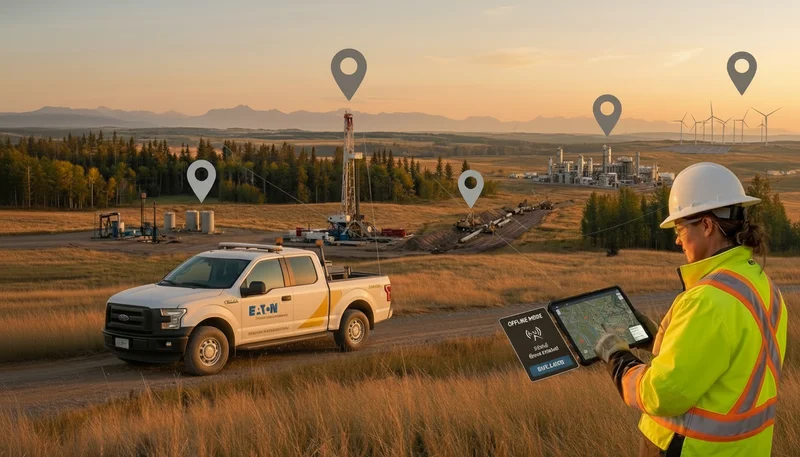
Field operations are fundamentally spatial, yet traditional tools hide that reality behind rows and columns. Use a map‑based portfolio view where each project and task is visible as a location, so it becomes obvious where work is clustered, where travel is being wasted, and where risk is concentrated. When you can see projects geographically, you can plan routes, allocate crews, and prioritize inspections more intelligently. - Build a lightweight cadence for portfolio reviews
Managing 50+ projects requires a different rhythm than managing five. Establish a weekly or bi‑weekly portfolio review where leaders look at the same live data, ask the same set of questions, and make decisions based on current information. Keep it short and focused on exceptions: projects over budget, behind schedule, or in high‑risk phases. The goal is to catch issues early, not to review every detail. - Protect focus by clarifying ownership and decision rights
Complexity multiplies when nobody is sure who owns which decisions. For each project and for the portfolio as a whole, define who is accountable for scope, budget, schedule, and risk. Make it clear when decisions can be made at the project level and when they require portfolio or executive input. Clear ownership reduces the back‑and‑forth that often slows down large project portfolios.
How does this look in different field industries?
In oil and gas, managing 50+ projects might mean juggling well abandonments, pipeline integrity work, and facility upgrades across a wide geography. Here, the ability to visualize projects on leases and rights‑of‑way, align contractors across multiple sites, and keep regulators informed is critical. A portfolio view helps ensure that crews are not criss‑crossing territories and that high‑risk assets receive attention first.
For environmental and engineering consultancies, the portfolio might span dozens of Phase I and Phase II assessments, remediation programs, and monitoring campaigns. Each client has its own expectations, reporting formats, and deadlines. Centralizing project information and standardizing internal workflows makes it easier to keep every client informed while using similar internal processes across the board.
Construction and infrastructure owners often face a mix of capital projects, maintenance programs, and smaller site upgrades. Here, the challenge is balancing long‑duration projects with urgent work that appears suddenly, such as emergency repairs. A clear portfolio view, especially one tied to locations, allows teams to reprioritize quickly without losing sight of long‑term commitments.
Across all of these sectors, the underlying pattern is the same: once you have dozens of active projects, you need to think and act at the portfolio level, not just at the project level. The tools and processes that worked at five projects need to evolve to support fifty.
Where should you start if you are still living in spreadsheets?
If you are not ready to overhaul your entire tool stack, start small. Begin by inventorying your active projects and building a simple portfolio list that lives in one place and is updated weekly. Even a basic shared view of project names, owners, locations, phases, and budget status will surface surprises, duplication, and gaps you could not see before.
Next, define your minimum viable standard for reporting. Decide what every project must report weekly: changes in scope, current budget status, and the top three risks. Pick a pilot group, such as one region or a single program (for example, abandonment or ESA work), and apply the centralize‑standardize‑automate‑visualize framework there before rolling it out more broadly.
From there, look for opportunities to introduce map‑based views of active sites. Even a simple geographic representation of projects will uncover coordination and routing opportunities you are currently missing. As you mature, consider using a GIS‑based project and portfolio platform like Matidor to centralize sites, tasks, documents, and field data in one live map‑driven workspace. This gives operations and project leaders real‑time visibility into their entire portfolio, which makes it easier to plan work, manage risk, and keep stakeholders aligned. If you want to see what a 50+ project portfolio looks like on a live map, you can book a short demo and explore a sample workspace.
To preview the complete workflow before booking a demo, watch the end-to-end Matidor platform walkthrough.
Frequently asked questions about managing 50+ field projects
How many projects can a team manage before spreadsheets stop working?
Most teams find that spreadsheets become unreliable somewhere between 10 and 20 active projects. Below that, individual project managers can keep track of context and updates in their heads. Beyond that, information is scattered across personal files and inboxes, and leadership loses a clear view of the portfolio.
What information should be in a field project portfolio view?
A useful project portfolio view includes project basics (owner, locations, scope, key dates), financials (budget, forecasts, and actuals), and status (current phase, key risks, and blockers), all in one place. It should be easy to filter by region, project type, or risk level, so you can quickly identify where to focus attention. Ideally, this information is updated automatically instead of relying on manual copy‑and‑paste.
How can automation help with large project portfolios?
Automation reduces the time spent on low‑value work like consolidating updates, updating dashboards, and sending reminders. Examples include automated status rollups, budget syncing from field costs, and notifications when milestones slip or tasks are overdue. This lets project managers spend more time resolving issues and less time preparing reports.
Why does visualizing projects on a map matter?
Field work happens in physical space, not just in schedules and spreadsheets. A map‑based view of your projects shows where work is located, which reveals patterns you cannot see in a table, such as clusters of work, overlapping routes, or areas of concentrated risk. This helps teams coordinate crews, optimize travel, and prioritize work more effectively.
How can a GIS‑based platform like Matidor support managing 50+ projects?
A GIS‑based platform like Matidor gives you a single live view of all projects, sites, and tasks on a map, tied to budgets, documents, and field updates. This makes it easier to centralize portfolio data, standardize workflows, and automate reporting, all while seeing the geographic reality of your work. For teams managing dozens of field projects, it replaces spreadsheet chaos with a clear, shared picture of the entire portfolio.
.webp)
.webp)
.webp)
.webp)
.webp)
.webp)
.webp)
.webp)

.webp)
.webp)
.webp)
.webp)
.webp)
.webp)
%20(2).webp)
.webp)
.webp)
.webp)
















.webp)

.webp)

.jpg)


%20(1).webp)



.jpg)

.jpg)
.jpg)
.jpg)


.jpg)